
Introduction to Glowforge: A Smart Desktop Laser Cutter for Modern Creators

source: Glowforge
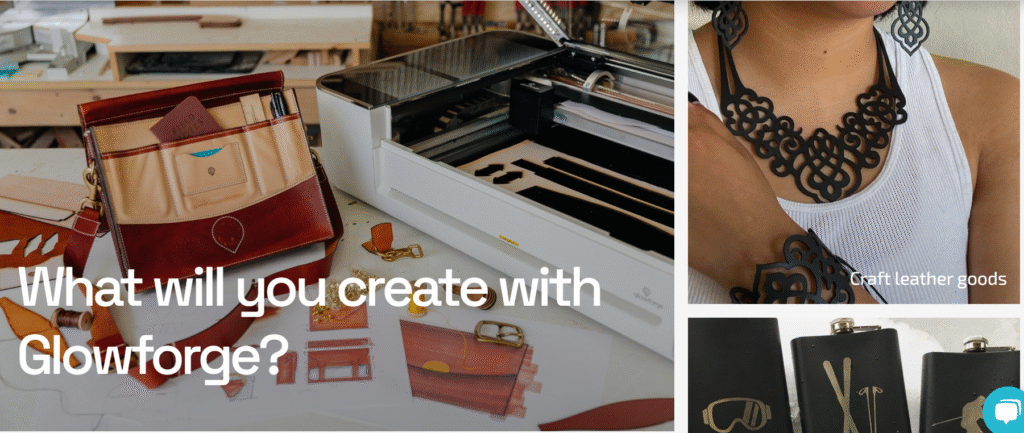
Glowforge is an innovative desktop laser cutting and engraving machine that has redefined digital fabrication for hobbyists, educators, designers, and small business owners. Unlike conventional 3D printers that add material to build an object, Glowforge uses a subtractive process powered by a high-precision CO₂ laser to cut, score, and engrave designs onto a wide variety of materials. These include wood, acrylic, leather, fabric, paper, glass, cardboard, and even some metals with the proper treatment.
Founded in 2014 and headquartered in Seattle, Washington, Glowforge Inc. entered the market with a mission to make professional-grade laser technology accessible to everyday users. With a sleek, compact design and powerful software that runs in the cloud, Glowforge eliminates the need for complex installation or technical know-how. Users simply upload their designs—whether created in Adobe Illustrator, Inkscape, or even hand-drawn and scanned—and the Glowforge software takes care of the rest, automatically adjusting settings for the chosen material.
What sets Glowforge apart is its blend of precision, user-friendliness, and versatility. The machine features autofocus technology, a built-in camera for live previews, and automatic material recognition with Proofgrade™ materials. These features ensure consistent results and reduce errors, making it ideal for rapid prototyping, product customization, classroom learning, and artistic exploration.
Glowforge has found a strong following in industries such as personalized product design, education, architecture, and e-commerce. Its ability to quickly produce professional-quality items—like signage, jewelry, home décor, packaging, and promotional products—makes it a valuable tool for entrepreneurs and makers looking to streamline production and increase creativity.
As demand for customizable, on-demand products grows, Glowforge continues to lead the way in laser cutting innovation by providing a powerful, affordable, and scalable solution for anyone with a creative vision.
Glowforge Product Line: Explore the Models and Choose What Fits Your Needs
source: Glowforge
Glowforge offers a range of high-quality laser cutting and engraving machines tailored for creators of all experience levels. Whether you’re a hobbyist crafting at home, an educator enriching classroom projects, or an entrepreneur running a product-based business, Glowforge has a model to meet your specific needs. Each unit combines advanced laser technology with an intuitive user experience, making it easier than ever to bring creative ideas to life.
Below is an overview of the available Glowforge models, designed to help you make an informed decision based on your goals, materials, and usage.
🔹 1. click here aura
Ideal for hobbyists, students, and light crafting
The Glowforge Aura is a compact and affordable diode laser cutter designed for entry-level users. It’s perfect for simple engraving and light cutting tasks on materials like wood, paper, and acrylic. With an easy-to-use interface and quiet operation, the Aura is a great choice for home use and creative exploration.
- Laser Type: Diode Laser
- Key Features: Compact design, beginner-friendly software
- Best For: Crafts, scrapbooking, DIY gifts
- Price Range: Entry-level
🔹 2.Basic
Perfect for beginners and casual makers
The Glowforge Basic features a 40-watt CO₂ laser and delivers professional-quality results at an accessible price point. It supports a wide variety of materials and is ideal for personal use, small projects, and learning the basics of laser engraving and cutting.
- Laser Type: 40W CO₂ Laser
- Key Features: Live camera preview, manual focus, cloud-based design software
- Best For: Personalized gifts, artwork, educational projects
- Price Range: Mid-tier
🔹 3. Glowforge Plus
Designed for frequent use and growing businesses
The Glowforge Plus offers faster processing, improved components, and greater reliability compared to the Basic model. It’s built for more demanding workloads, making it a smart choice for small businesses or creators who produce work on a regular basis.
- Laser Type: 40W CO₂ Laser
- Key Features: Enhanced cooling system, faster cutting speed, improved optics
- Best For: Etsy shops, boutique brands, classroom makerspaces
- Price Range: Upper mid-tier
🔹 4. Glowforge Pro
Engineered for professionals and commercial production
The Glowforge Pro is the most advanced model in the lineup, built for high-volume and extended use. It includes a powerful 45-watt CO₂ laser and a Pro Passthrough Slot, allowing users to work with oversized materials. With advanced cooling and fast operation, it’s ideal for commercial production, signage, furniture prototyping, and more.
- Laser Type: 45W CO₂ Laser
- Key Features: Passthrough slot, highest cutting speed, continuous operation
- Best For: High-output businesses, industrial design, large-format projects
- Price Range: Premium
✅ Product Comparison
| Model | Laser Type | Power | Best For | Price Tier |
|---|---|---|---|---|
| Glowforge Aura | Diode Laser | Low | Beginners, crafts, light use | $ |
| Glowforge Basic | CO₂ (40W) | Medium | Home use, entry-level projects | $$ |
| Glowforge Plus | CO₂ (40W) | Medium | Business, frequent usage | $$$ |
| Glowforge Pro | CO₂ (45W) | High | Professionals, commercial output | $$$$ |
Glowforge in Education: Empowering Hands-On Learning for the Classroom
Glowforge is more than just a laser cutter—it’s a powerful educational tool that brings creativity, problem-solving, and innovation directly into the classroom. As schools increasingly adopt project-based learning and STEM/STEAM programs, educators are turning to Glowforge to provide students with real-world, hands-on experiences that bridge art, science, design, and technology.
🎓 Why Educators Choose
Glowforge helps teachers foster curiosity and engagement by transforming lessons into interactive, tactile experiences. From elementary classrooms to college labs, Glowforge allows students to explore subjects like:
- Engineering and Design Thinking
- Math and Geometry through 3D Visualization
- Entrepreneurship and Business Skills
- Art, Graphic Design, and Digital Fabrication
- History and Cultural Studies via Artifact Replication
Glow forge’s intuitive software and safe design make it ideal for supervised classroom use, even for younger learners. Students can upload digital drawings, convert hand-drawn sketches into engravable designs, and work with a wide variety of materials including wood, cardboard, fabric, and acrylic.
🛠️ Ease of Use in the Classroom

source: Glowforge
Glow forge is designed to be plug-and-play, requiring no advanced technical background. Educators can quickly set up the machine and begin using it with students in a single class period. The cloud-based interface is compatible with Chromebooks, Windows, macOS, and tablets—devices already common in many school environments.
Key classroom-friendly features include:
- Live camera preview for accurate alignment
- Auto-focus and material recognition (with Proofgrade™ materials)
- Quiet operation and filtered exhaust system for indoor use
- Reusable design files that streamline repeat projects
📚 Curriculum Integration and Resources
Glowforge provides ready-to-use lesson plans, project templates, and training modules through its education portal. These resources align with national education standards and are adaptable for various grade levels and subjects.
Examples of classroom projects include:
- Designing and engraving personalized name tags
- Creating 3D models of geometric shapes
- Crafting historical timelines and maps
- Building prototypes for inventions or product ideas
- Producing custom classroom tools like rulers and organizers
👩🏫 Professional Development and Support
Glowforge supports educators through training materials, teacher guides, and a vibrant online community of education professionals. Teachers can share ideas, troubleshoot challenges, and collaborate across disciplines to maximize the educational impact of the machine.
Additional benefits include:
- Education pricing discounts
- Ongoing product updates and improvements
- Access to a large library of user-generated content
- Dedicated customer support team
🌟 The Impact on Learning
Glowforge encourages critical thinking, creativity, and collaboration, making it an ideal tool for 21st-century classrooms. It helps students see the real-world applications of what they learn, while giving them confidence in design, fabrication, and digital skills.
Educators using Glowforge report higher levels of student engagement, improved project outcomes, and a renewed excitement for learning across all subjects.
Glowforge for Entrepreneurs: Turn Creative Ideas Into Profitable Products
In today’s fast-paced digital economy, entrepreneurs are constantly seeking tools that combine creativity, flexibility, and cost-efficiency. Glow forge offers an ideal solution for small business owners, makers, and product-based startups looking to create and sell custom items with a professional finish—right from a home studio or small workshop.
With its precision laser cutting and engraving capabilities, Glowforge helps entrepreneurs quickly prototype ideas, personalize products, and scale production—all without relying on expensive outsourcing or large manufacturing equipment.
💼 Why Entrepreneurs Choose Glowforge
Glowforge is especially appealing to small business owners and solo creators because it bridges the gap between concept and commerce. Whether you’re designing custom products, fulfilling client orders, or selling on platforms like Etsy, Shopify, or Amazon Handmade, Glowforge empowers you to take full control of your product development process.
Key benefits for entrepreneurs include:
- Fast prototyping and production
- Custom product creation with intricate detail
- Low material costs and high profit margins
- Ability to work with dozens of materials
- No minimum order quantities or inventory constraints
🛠️ Product Possibilities with Glowforge
Entrepreneurs use Glow forge to design and sell a wide variety of unique, handmade or custom-branded items, such as:
- Personalized gifts (e.g., keychains, wallets, ornaments)
- Custom signage for events, homes, or businesses
- Jewelry, accessories, and home décor
- Branded promotional products
- Packaging, labels, and product displays
- Wedding and event items (e.g., table numbers, invitations)
Because the machine is capable of working with materials like wood, acrylic, leather, fabric, and glass, business owners can easily expand their product lines without needing additional tools or equipment.
🚀 Easy Integration into Your Business
Glowforge is designed for simplicity. The setup takes under an hour, and the web-based software works with most design programs including Adobe Illustrator, CorelDRAW, Inkscape, and Canva. If you don’t have graphic design experience, the Glowforge dashboard includes a growing library of templates and ready-to-print designs.
Other entrepreneurial advantages:
- Quick turnaround times – Create and ship same-day
- Low overhead – Operate from a home office or small studio
- Scalability – Upgrade to Glowforge Pro for higher output
- Brand differentiation – Offer truly custom, handcrafted items
💡 Real-World Success Stories
Many entrepreneurs have used Glowforge to launch and grow profitable businesses. From Etsy sellers generating five figures monthly, to local artisans running pop-up shops, Glowforge users credit the machine with:
- Reducing startup costs
- Allowing faster time-to-market
- Giving them full control over branding and quality
Whether you’re producing small-batch goods or one-of-a-kind designs, Glowforge gives your business a competitive edge in the growing market for customized, handmade, and personalized products.
📈 Return on Investment (ROI)
Glowforge isn’t just a creative tool—it’s a smart investment. With popular models like the Glowforge Plus and Pro, many entrepreneurs report earning back the cost of their machine in a matter of weeks or months. By selling custom products at a premium, your Glowforge can quickly become one of the most valuable assets in your business toolkit.
Glow forge for Small Business Owners: Unlocking Creative Growth and Profitability
For small business owners, managing time, resources, and production efficiency is crucial. Glowforge offers a practical and scalable solution for those looking to streamline their operations, enhance product offerings, and increase profitability—all without sacrificing quality or creativity.
Whether you’re running a one-person shop or a small team, Glowforge empowers you to take complete control of your product design and production process from your own workspace—no outsourcing, no delays, and no expensive manufacturing equipment.
🛠️ A Powerful Tool for Product Customization
One of the biggest advantages Glowforge offers small business owners is the ability to produce high-quality, custom-made products on demand. Using a precision CO₂ laser, Glowforge can cut, engrave, and etch a wide variety of materials, including:
- Wood and plywood
- Acrylic and plastics
- Leather and fabric
- Cardboard and paper
- Glass and anodized aluminum (for engraving)
This versatility allows you to diversify your product line or tailor your items to meet individual customer needs—without increasing production complexity.
🛒 Products Small Businesses Can Create with Glow.forge
Glowforge helps small business owners build a strong brand presence by offering unique, handcrafted, or personalized items that are in high demand. Popular product ideas include:
- Personalized gifts and keepsakes
- Custom signs and wall art
- Home décor items
- Branded merchandise and promotional products
- Event items like cake toppers, invitations, and guestbooks
- Packaging inserts and product displays
Because production is in-house, you maintain full control over design, materials, and quality—allowing for better margins and a faster turnaround time.
💼 Benefits for Small Business Operations
Glowforge fits easily into a home office, retail studio, or small-scale workshop. With its plug-and-play setup and cloud-based software, it minimizes your reliance on technical expertise or external support. Key advantages include:
- Low operating cost
- Rapid prototyping and small-batch production
- No minimum order quantity
- Quick design customization for individual orders
- Easy integration with platforms like Etsy, Shopify, or WooCommerce
Many small business owners also use Glowforge to create branded packaging, display signage, and other business materials that help elevate their professional image.
📈 Scalability and Return on Investment
Starting with a Glowforge Basic or Plus can be enough to launch or enhance your business. For higher output and oversized materials, the Glowforge Pro offers increased speed and a Passthrough slot for continuous cutting.
Business owners commonly report earning back the cost of their Glowforge machine in a matter of months through regular product sales. The flexibility to fulfill both standard and custom orders also helps maintain consistent cash flow.
👥 Community Support and Resources
Glowforge provides a vibrant and active community of small business users who share design files, business tips, and technical support. In addition, Glowforge offers:
- Free design templates and tutorials
- Proofgrade™ materials for optimized performance
- Business case studies and inspiration from real users
- Responsive customer support and educational content
Glowforge for Real Estate Agents: Create Personalized Marketing That Stands Out
In the highly competitive real estate industry, first impressions matter—and successful agents know that standing out requires more than just a business card and a handshake, a desktop laser cutter and engraver, provides real estate professionals with a unique way to market properties, build client relationships, and elevate their brand through creative, custom-made materials.
Whether you’re an independent realtor, a team leader, or part of a brokerage,allows you to personalize your business in memorable and meaningful ways—while keeping marketing costs low and turnaround times fast.
🏡 Why Real Estate Agents Are Using Glowforge
Glowforge empowers agents to create high-quality, customized items that leave a lasting impression on clients and prospects. Unlike traditional print marketing, laser-cut and engraved materials offer a premium, tactile feel that enhances perceived value and professionalism.
With Glow forge, you can design and produce marketing tools and gifts that help you:
- Build stronger client relationships
- Differentiate your brand in a crowded market
- Enhance the presentation of listings
- Add a personal touch to your service offerings
🛠️ Creative Uses of Glowforge in Real Estate
Real estate professionals are using Glowforge to make standout, personalized products for both marketing and client appreciation. Here are some practical and popular examples:
🔹 Marketing Materials
- Custom-cut “For Sale” or “Open House” signs
- Laser-engraved business cards or wood postcards
- Branded keychains, luggage tags, or notepads
- Personalized door hangers or yard stake signage
🔹 Client Gifts
- House-shaped closing gifts (e.g., engraved cutting boards or key holders)
- Welcome signs for new homeowners
- Personalized address plaques or coasters
- Custom gift packaging for wine, candles, or baked goods
🔹 Office and Event Use
- Branded tabletop displays and signage for trade shows
- Custom awards or plaques for top agents or partners
- Branded décor for open houses or client appreciation events
These types of thoughtful, tangible materials not only leave an impression but also increase referral potential and build long-term brand loyalty.
💼 Efficient, In-House Customization
Real estate professionals often work on tight timelines, especially around closing dates or last-minute showings. Glowforge allows you to produce custom items quickly and affordably—right from your home office or brokerage.
Benefits include:
- Fast turnaround on marketing materials
- No need for outsourcing or bulk orders
- Flexible design for one-off or repeat projects
- Creative freedom to align items with your personal brand
Even agents with no design background can get started easily thanks to Glowforge’s cloud-based software, camera preview feature, and compatibility with tools like Canva, Adobe Illustrator, and Inkscape.
🎯 Branding That Feels Personal
One of the biggest advantages of using Glowforge in real estate is the ability to reinforce your personal brand in a memorable, tactile way. Instead of generic printed brochures or mass-produced items, you can deliver high-touch, high-impact materials that show clients you care—without increasing your marketing budget.
This level of personalization builds trust and helps turn first-time clients into lifelong advocates of your business.
for Event Planners: Craft Unforgettable Experiences with Custom Details
In the world of event planning, every detail matters. Whether it’s a wedding, corporate function, birthday, or brand launch, clients expect events that are visually stunning, cohesive, and personalized. That’s where Glowforge comes in—a powerful desktop laser cutter and engraver that allows event planners to create bespoke pieces that elevate any occasion.
With Glowforge, event professionals can design and produce high-quality signage, décor, favors, and branding materials—without relying on third-party vendors or mass production timelines. It puts creative control back in your hands and helps you deliver elevated, memorable events for every client.
🎉 Why Event Planners Use Glowforge
gives event planners the ability to create custom-made, professional-quality items in-house, which saves time, increases profit margins, and ensures creative consistency. You can respond quickly to client requests, produce one-of-a-kind designs, and tailor every piece to match a theme or brand identity.
Key benefits include:
- On-demand customization
- Quick production and prototyping
- High-quality finishes for premium events
- Cost savings on outsourced décor and materials
- Full creative control from concept to execution
✨ What You Can Create with Glow forge
Event planners are using Glowforge to craft everything from large-format signage to intricate favors that double as keepsakes. Below are just a few popular project ideas:
🔹 Custom Signage & Décor
- Welcome signs and seating charts
- Table numbers and name cards
- Cake toppers and bar menus
- Directional signs for large venues
- Themed wall art and installations
🔹 Personalized Favors & Gifts
- Laser-engraved coasters, keychains, or ornaments
- Custom tags and packaging for gift bags
- Wedding or baby shower keepsakes
- Branded swag for corporate events
🔹 Branded Event Materials
- Engraved invitations or RSVP cards
- Logo plaques or award trophies
- Display pieces for vendor booths and trade shows
- Branded guest experiences for product launches
With Glowforge, you can work with a wide variety of materials, including wood, acrylic, leather, paper, and more—allowing endless creative freedom across different event types and styles.
🛠️ A Practical Tool for Creative Professionals
Glowforge’s user-friendly design makes it ideal for event planners with limited technical experience. Setup is simple, and the software is cloud-based—compatible with most laptops, tablets, and Chromebooks. You can import your own designs or use templates available in the Glowforge catalog.
Top features that benefit event planners:
- Live camera preview for accurate material placement
- Auto-focus and material recognition for consistent quality
- Quick production times for tight deadlines
- No need for minimum orders or large inventories
This gives you the freedom to experiment, customize, and scale as needed—all without long lead times or vendor delays.
💼 Boosting Your Business and Your Brand
Offering Glowforge-made items adds value to your event planning services and can be a significant differentiator in a competitive market. Clients are willing to pay more for personalized touches, and by producing these items in-house, you can improve your margins while enhancing client satisfaction.
Whether you’re planning luxury weddings, corporate events, or creative pop-ups, Glowforge allows you to elevate the experience while staying in full control of production.
🔧 Models & Pricing
1. Glowforge Pro
- Price: $5,999
- Features:
- 45W laser power
- Pro Passthrough slot for continuous material feeding
- Enhanced cooling for all-day use
- Live camera preview and autofocus
- Includes $150 worth of Proofgrade materials
- 12-month worry-free warranty
- Ideal for: Small businesses and entrepreneurs needing high-speed, large-format capabilities
2. Glowforge Plus
- Price: $4,499
- Features:
- 40W laser power
- Faster than the Basic model
- Live camera preview and autofocus
- Includes $150 worth of Proofgrade materials
- 12-month worry-free warranty
- Ideal for: Hobbyists and small businesses requiring efficient, high-quality engraving and cutting,
3. Glow forge Basic
- Price: $3,995
- Features:
- 40W laser power
- Live camera preview and autofocus
- Includes $150 worth of Proofgrade materials
- 12-month worry-free warranty
- Ideal for: Beginners and hobbyists exploring laser cutting and engraving
🌬️ Optional Accessories
Glowforge Air Filter
- Price: $1,295
- Features:
- Allows indoor use without external ventilation
- Cleans the air exiting the Glowforge
- Compact design, approximately the size of a recycle bin
- Ideal for: Users without access to window ventilation
🎁 Power Package
- Price: Varies
- Includes:
- Glowforge Pro
- Air Filter
- 4-year extended warranty
- $150 worth of Proofgrade materials
- Ideal for: Educators and institutions seeking a comprehensive setup
💳Premium Subscription
- Price:
- $50 per month
- $600 annually
- Discounted annual rate: $239
- Features:
- Access to an extensive design catalog
- Advanced design tools and features
- Note: Subscription is optional; Glowforge can be used without it
💰 Financing Options
Glowforge offers financing through Affirm, allowing monthly payments starting as low as $22.50/month. This makes it accessible for individuals and small businesses looking to invest in laser cutting technology.
✅ Pros and Cons: Is It the Right Laser Cutter for You?
Glowforge has earned a strong reputation in the creative and maker communities for its user-friendly design, high-quality results, and powerful features. Whether you’re a hobbyist, educator, small business owner, or entrepreneur, Glowforge offers many advantages—but it’s not without a few limitations.
Here’s a balanced look at the pros and cons of using a Glowforge laser cutter to help you decide if it’s the right tool for your needs.
✅ Pros of Glow forge
🔹 1. User-Friendly Interface
Glowforge is known for its intuitive, cloud-based software that works seamlessly with Windows, Mac, Chromebooks, and tablets. The drag-and-drop interface, real-time camera preview, and autofocus features make it ideal for beginners and professionals alike.
🔹 2. High-Quality Precision and Detail
Glowforge uses a powerful CO₂ laser (40W or 45W) that delivers clean, precise cuts and engravings. It supports fine detail work, making it great for intricate designs, custom artwork, and professional-quality products.
🔹 3. Wide Range of Materials
Glowforge works with a variety of materials, including:
- Wood and plywood
- Acrylic and plastics
- Leather and fabric
- Cardboard and paper
- Glass (engraving only)
- Coated metals
This versatility allows you to create everything from signage and jewelry to packaging and promotional items.
🔹 4. No Design Background Required
You don’t need to be a graphic designer to use Glowforge. You can import designs from popular tools like Canva, Adobe Illustrator, or Inkscape—or use templates from the Glowforge catalog.
🔹 5. Perfect for Custom and Small-Batch Production
Glowforge is great for small business owners or Etsy sellers who need to create personalized items or small product runs without outsourcing or mass production.
🔹 6. Compact and Desktop-Friendly
Unlike large industrial laser cutters, Glowforge is compact enough for use in homes, offices, and classrooms, with minimal installation requirements.
🔹 7. Active Community and Support
Glowforge has a helpful community of users and extensive online resources, including tutorials, forums, and responsive customer support.
⚠️ Cons of
🔻 1. Requires Internet Connection
The Glow forge software runs entirely in the cloud. This means you need a reliable internet connection to use it, which can be limiting for users in remote or offline environments.
🔻 2. Limited Workspace Size
Glowforge’s cutting area is large enough for most projects, but it’s not suitable for industrial-scale manufacturing. The Pro model does allow passthrough for longer materials, but even that has some design limitations.
🔻 3. Odor and Ventilation Issues
When cutting materials like wood or acrylic, the process produces smoke and odor. Although a vent hose is included, indoor users may need to purchase the optional Glowforge Air Filter, which adds to the cost.
🔻 4. Slower Than Industrial Lasers
Glowforge is designed for desktop use, which means it’s not as fast as high-end industrial machines—especially for large-scale or high-volume jobs.
🔻 5. Premium Features Require a Subscription
To access the full range of design tools and catalog resources, you’ll need a Glowforge Premium subscription, which costs extra. However, the basic functionality is still available without it.
🔻 6. Cost May Be High for Hobbyists
While competitively priced for what it offers, can still be a significant upfront investment, especially for casual users. Models range from $3,995 to $5,995+, not including materials and optional accessories.

One Response