

Introduction
source: Tidio
In today’s fast-paced digital landscape, providing instant, personalized customer support is no longer optional—it’s essential. That’s where tools like Tidio come into play. Whether you’re running an online store, managing client services, or simply looking to improve customer engagement, Tidio promises a powerful combination of live chat, chatbots, and automation—all in one intuitive platform.
But with so many communication tools on the market, how does Tidio really stack up? In this in-depth review and comparison, we’ll explore everything you need to know about Tidio—from its core features and pricing to ease of use, integrations, and more. By the end, you’ll know whether Tidio is the right fit for your business needs—or if you should keep looking.
Overview of Tidio
Tidio is a customer communication platform that combines live chat, chatbots, and help desk features into a single, easy-to-use interface. Designed for small to medium-sized businesses, Tidio helps companies engage website visitors in real-time, automate responses with AI-powered bots, and manage customer inquiries across multiple channels—all from one dashboard.
Launched in 2013, Tidio has grown rapidly and now serves over 300,000 businesses globally. It’s especially popular among eCommerce stores using platforms like Shopify, WooCommerce, and Wix, thanks to its seamless integrations and focus on sales-driven automation.
At its core, Tidio aims to simplify customer support while boosting conversion rates. Whether you’re answering a quick pre-sale question or providing long-term support, Tidio helps streamline the process so you can spend less time responding and more time growing your business.
Key features of Tidio include:
- Live chat with real-time visitor monitoring
- Customizable AI chatbots
- Multichannel inbox (including Messenger, Instagram, email, and more)
- Pre-built automation templates
- Integration with over 20 platforms and tools
Tidio’s flexibility makes it a strong option for startups, freelancers, and growing businesses alike. In the sections below, we’ll break down how Tidio performs in key areas like ease of use, automation, support, and pricing.
Ease of Use
One of Tidio’s strongest selling points is its user-friendly interface. Whether you’re a tech-savvy marketer or a first-time website owner, Tidio is designed to be accessible right out of the box.
Quick Setup
Getting started with Tidio takes just a few minutes. After signing up, users can install the chat widget on their website with a simple code snippet or by using dedicated plugins for platforms like Shopify, WordPress, or Wix. Tidio also provides a guided onboarding process to help users configure their live chat and chatbot settings quickly.
Intuitive Dashboard
Tidio’s dashboard is clean, well-organized, and easy to navigate. All conversations—from live chat, email, and social channels—are centralized in a single multichannel inbox. This unified experience helps teams respond faster and avoid the confusion of switching between platforms.
Chatbot Builder Simplicity
Creating automated flows with Tidio’s drag-and-drop chatbot builder is straightforward. Even users with no coding experience can build effective bots using pre-designed templates or custom workflows. You can easily define triggers, conditions, and actions in a visual editor that’s both flexible and beginner-friendly.
Mobile & Desktop Apps
Tidio also offers mobile apps for iOS and Android, along with a desktop app, ensuring that business owners and support agents can stay connected on the go. The mobile interface mirrors the desktop version closely, allowing for consistent usability across devices.
Minimal Learning Curve
Compared to more complex CRM or support platforms, Tidio has a relatively shallow learning curve. Most users report becoming comfortable with the platform within a day or two of regular use. For those who want extra help, Tidio provides an extensive knowledge base, live support, and interactive tutorials.
Live Chat Features
One of the core components of Tidio is its live chat functionality, designed to help businesses provide timely and efficient customer support. The platform enables real-time conversations between website visitors and support teams, enhancing user experience and improving communication.
Real-Time Messaging
Tidio’s live chat allows for seamless, real-time communication. Messages are delivered instantly, enabling support agents to respond to inquiries without delay. This immediacy helps businesses address customer questions promptly, which can contribute to higher satisfaction and retention rates.
Visitor Tracking
The platform includes built-in visitor monitoring tools that provide insight into user behavior. Businesses can see which pages visitors are viewing, how long they stay on the site, and where they are located. This information can help support teams tailor their responses and offer more personalized assistance.
Automated Chat Triggers
Tidio offers automated chat triggers that can initiate a conversation based on specific user actions. For instance, a message can appear when a visitor spends a certain amount of time on a page or appears to be exiting the site. These triggers can help re-engage visitors and encourage interaction without manual effort.
Pre-Chat Forms
To help qualify leads and collect essential information, Tidio supports customizable pre-chat forms. These forms can request details such as a user’s name, email address, or reason for contacting support. This data can be useful for follow-up communication and for organizing customer inquiries efficiently.
Multi-Agent Support
Tidio’s live chat system is equipped to handle teams with multiple agents. It includes features such as typing indicators, chat assignments, and conversation history, which enable smooth collaboration among support staff and ensure consistency in responses.
File Sharing and Media Support
The platform allows for the exchange of files, images, and links directly within the chat window. This functionality is useful for sending product images, instructional documents, or support resources during a conversation.
Real-Time Messaging
The real-time messaging feature in Tidio is designed to facilitate instant communication between website visitors and support teams. As soon as a visitor initiates a chat, the system allows for immediate message delivery, ensuring that responses are quick and fluid.
This real-time capability is especially valuable for addressing customer inquiries as they arise—whether it’s a question about a product, assistance with a technical issue, or help navigating the website. The prompt exchange of information helps reduce waiting times, improve customer satisfaction, and foster a more interactive experience on the site.
Tidio’s live chat window is lightweight and responsive, meaning it does not slow down the site’s performance and works effectively on both desktop and mobile devices. Support agents also receive instant notifications when a new message arrives, enabling them to provide timely assistance even during high-traffic periods.
Overall, the real-time messaging function plays a critical role in improving customer engagement and enabling businesses to offer responsive, human-centered support.
Visitor Tracking
Tidio includes built-in visitor tracking capabilities that give businesses deeper insight into user behavior on their website. This feature allows support agents to view detailed information about each visitor in real time, including their location, device type, pages viewed, time spent on site, and browsing history.
With this context readily available, support teams can better understand visitor intent and provide more relevant and timely assistance. For example, if a user has been viewing a product page for an extended period, a support agent can proactively reach out to answer any questions or offer additional information.
The visitor tracking panel is integrated directly into Tidio’s dashboard, making it easy to monitor activity without switching between tools. This visibility can be especially useful for sales teams, marketing professionals, and customer service agents who want to personalize interactions and improve engagement.
By using visitor tracking, businesses can move beyond reactive support and begin delivering proactive, data-driven service that helps guide users through their journey on the website.
Automated Chat Triggers
One of the most valuable features in Tidio is its automated chat triggers, which allow businesses to initiate conversations based on specific user behaviors. These triggers are designed to improve engagement by reaching out to visitors at the right moment—without requiring manual input from support agents.
With Tidio, you can create custom rules that prompt the chat widget to send a message automatically. For example, a trigger can be set to display a welcome message when a user visits the homepage, offer assistance when someone spends more than 30 seconds on a product page, or send a reminder when a visitor attempts to leave the site.
These proactive messages can help answer common questions, guide users toward relevant content, or provide a clear path to conversion. Triggers can be tailored to fit different business goals, whether that’s reducing cart abandonment, increasing newsletter signups, or offering quick support during browsing.
Setting up automated chat triggers in Tidio is straightforward, thanks to a visual interface that allows users to define conditions and actions without any coding. This makes it accessible for small business owners and non-technical users who want to create a more responsive and interactive website experience.
Pre-Chat Forms
Tidio offers customizable pre-chat forms that help businesses collect essential information from visitors before a live conversation begins. These forms can request details such as the visitor’s name, email address, and the reason for their inquiry—enabling support agents to prepare for the conversation and respond more effectively.
Pre-chat forms serve multiple purposes. For support teams, they help prioritize requests and route inquiries to the appropriate department or agent. For marketing and sales, they provide an opportunity to capture leads and build a contact list for future outreach or follow-up.
Tidio allows users to fully customize the appearance and content of these forms to match their brand and communication style. You can choose which fields to include, make certain fields optional or required, and tailor the messaging to suit the specific needs of your business.
Implementing pre-chat forms is especially useful for managing high volumes of inquiries and ensuring that each visitor gets the most relevant assistance. It also helps maintain a more organized and efficient support workflow.
In short, Tidio’s pre-chat form feature enhances both the user experience and internal operations by enabling more structured, personalized, and goal-oriented conversations from the very beginning.
Multi-Agent Support
Tidio supports multi-agent functionality, allowing teams of any size to collaborate efficiently within the platform. This feature is essential for businesses that need to manage multiple customer conversations simultaneously and provide timely responses.
With Tidio, each agent can have a dedicated profile, and conversations can be assigned to specific team members based on expertise or availability. This ensures that customer inquiries are handled by the most appropriate person, improving the overall quality of support.
The platform includes collaboration tools such as internal notes and conversation tagging, which help agents communicate with each other without involving the customer. Features like typing indicators and read receipts also provide transparency, so agents know when a colleague is responding or has seen a message.
Multi-agent support in Tidio is designed to keep workflows organized and prevent overlap or missed messages. This improves team productivity and ensures customers receive consistent and professional service.
Overall, Tidio’s multi-agent capabilities make it a practical choice for growing businesses that require scalable, team-based customer support solutions.
File Sharing and Media Support
Tidio includes robust support for sharing files and media within the live chat interface, enhancing the communication experience between businesses and their customers. This feature allows both agents and visitors to exchange images, documents, links, and other file types directly during a conversation.
The ability to share files is particularly useful for troubleshooting, product demonstrations, or providing additional resources. For example, a support agent can send a user a PDF manual, a screenshot to guide them through a process, or a link to a relevant webpage—all without leaving the chat window.
Tidio supports a variety of common file formats and ensures that shared content is delivered securely and efficiently. This reduces the need for follow-up emails or external file transfer services, streamlining the support process.
Additionally, the chat interface is designed to display shared images and media clearly, making it easier for both parties to view and reference shared content during their interaction.
By facilitating easy and direct file sharing, Tidio helps businesses offer more comprehensive and effective support, ultimately improving customer satisfaction and resolution times.
File Sharing and Media Support
Tidio enables seamless sharing of files and media within the chat interface, allowing both customers and support agents to exchange important documents, images, and links directly during conversations. This functionality enhances communication by making it easier to provide detailed assistance and clarify issues without the need for external tools.
Whether it’s sending product photos, instruction manuals, screenshots, or helpful links, the file-sharing feature helps streamline the support process and improve resolution times. The chat window supports a variety of common file types, ensuring compatibility and ease of use.
Additionally, shared media is displayed clearly within the chat, making it simple for both parties to view and reference during the conversation. This contributes to a more efficient and professional support experience.
By integrating file sharing and media support directly into the chat, Tidio helps businesses deliver richer, more interactive customer service that can lead to higher satisfaction and quicker problem-solving.
Mobile & Desktop Apps
Tidio offers dedicated mobile and desktop applications designed to keep businesses connected with their customers anytime, anywhere. These apps provide a seamless extension of the live chat experience, enabling support agents and business owners to respond promptly even when away from their primary workstation.
The mobile apps, available for both iOS and Android devices, feature an intuitive interface optimized for smaller screens. Users can receive real-time notifications, manage conversations, and access visitor information on the go. This flexibility is especially valuable for businesses with remote teams or those needing to provide support outside regular office hours.
Similarly, Tidio’s desktop applications for Windows and macOS deliver a full-featured experience, mirroring the web dashboard’s capabilities. With the desktop app, users can engage in multiple chats simultaneously, manage automation settings, and monitor visitor activity without opening a browser.
Both mobile and desktop apps sync automatically with the main Tidio platform, ensuring that conversations and data stay up to date across all devices. This unified approach supports efficient communication and helps teams stay responsive regardless of location.
Overall, Tidio’s mobile and desktop applications enhance accessibility and responsiveness, making it easier for businesses to maintain high-quality customer support at all times.
Minimal Learning Curve
Tidio is designed with usability in mind, making it accessible to users with varying levels of technical expertise. Whether you are a small business owner managing customer support yourself or part of a growing team, Tidio’s intuitive design helps minimize the time needed to become proficient.
The platform offers a clean and straightforward interface that organizes tools and features logically. New users can quickly navigate the dashboard, set up chat widgets, and configure basic automation without prior experience or technical knowledge.
Additionally, Tidio provides comprehensive resources to support learning, including a detailed knowledge base, video tutorials, and step-by-step guides. For users who require further assistance, customer support is available via chat and email to address questions or troubleshooting needs.
Thanks to this combination of simplicity and support, most users report becoming comfortable with Tidio within a short period, enabling businesses to start engaging with customers efficiently without a steep learning curve.
Pricing and Plans
source: Tidio
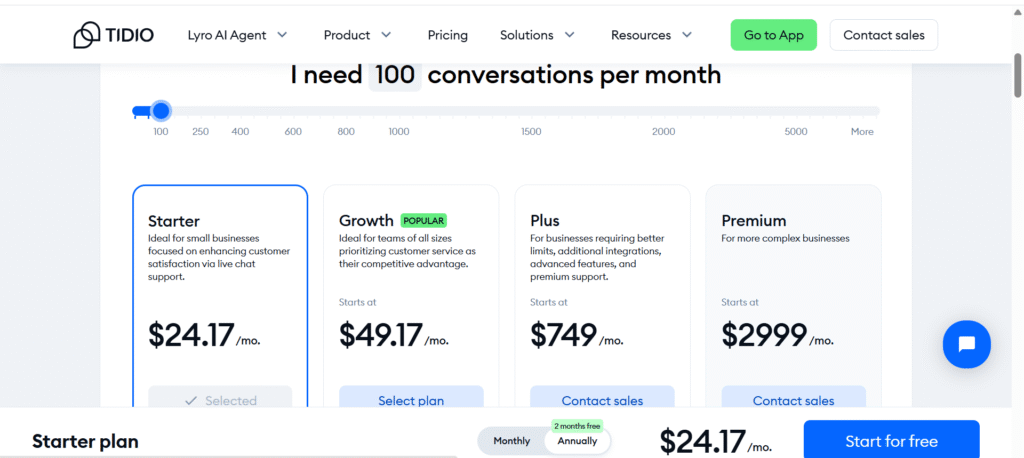
Tidio offers a range of pricing options designed to accommodate businesses of different sizes and needs, including a free plan for those just getting started. This tiered approach allows users to access essential features at no cost while providing the option to upgrade for more advanced capabilities.
- Free Plan: Ideal for small websites or businesses new to live chat, the free plan includes basic live chat functionality, limited chatbot automation, and up to 100 unique chatbot visitors per month. It also supports integration with popular platforms such as Shopify and WordPress.
- Communicator Plan: Priced competitively, this plan focuses on live chat features and allows unlimited chat operators and conversations. It’s suitable for businesses prioritizing real-time customer support without extensive automation.
- Chatbots Plan: This tier offers access to more advanced chatbot features, including unlimited chatbot visitors, advanced automation workflows, and detailed analytics. It’s designed for businesses looking to automate significant portions of their customer communication.
- Full Plan: Combining live chat and chatbot capabilities, the Full Plan is best for growing businesses that require a comprehensive communication solution. It includes all features, priority support, and advanced customization options.
Tidio’s pricing is transparent and monthly subscriptions can be canceled or adjusted at any time, providing flexibility as your business evolves. Additionally, the platform occasionally offers discounts and promotions, which can be beneficial for startups and small businesses on a budget.
Overall, Tidio’s pricing structure balances accessibility and functionality, making it a viable option for a wide range of companies, from startups to established enterprises.
Free Plan
Tidio offers a robust Free Plan designed to help small businesses and startups establish efficient customer support without any financial commitment. This plan provides access to essential features, allowing users to engage with customers effectively across various channels.
Key Features
- Live Chat: Engage with customers in real-time directly on your website.
- Help Desk: Manage and track customer inquiries through a centralized ticketing system.
- Social Media Integrations: Connect with customers via Facebook Messenger, Instagram, and WhatsApp.
- Mobile & Desktop Apps: Access your account and respond to customers on the go with dedicated applications.
- Visitor Information: View basic details about website visitors to personalize interactions.
- Canned Responses: Utilize pre-written replies to streamline communication.
- Basic Analytics: Monitor performance metrics to assess and improve customer support.
Usage Limits
- Handled Conversations: Up to 50 per month. A handled conversation is counted when an agent responds to a customer message.
- Chatbot Flows: Automated workflows can reach up to 100 unique visitors monthly.
- Lyro AI Conversations: A one-time allocation of 50 conversations for testing the AI capabilities.
Considerations
While the Free Plan offers a comprehensive set of tools, businesses with higher customer interaction volumes may find the limitations restrictive. For those requiring advanced features such as increased conversation limits, enhanced analytics, or additional automation capabilities, exploring Tidio’s paid plans may be beneficial.
Communicator Plan
The Communicator Plan from Tidio is designed for businesses that prioritize real-time customer support and want to manage unlimited live chat conversations with their visitors. This plan is suitable for teams focused on providing prompt, personalized assistance without needing extensive automation features.
Key Features
- Unlimited Chat Operators: Add as many support agents as needed to handle customer inquiries efficiently.
- Unlimited Live Chats: There are no limits on the number of live chat conversations, making it ideal for businesses with high visitor volumes.
- Real-Time Visitor Monitoring: Keep track of who’s browsing your website and engage with visitors proactively.
- Access to Mobile and Desktop Apps: Support your customers from anywhere with Tidio’s dedicated apps for iOS, Android, Windows, and macOS.
- Basic Chatbots: Use simple automation tools to handle frequently asked questions and streamline common tasks.
- Canned Responses: Improve response speed with predefined messages.
- Integrations: Connect with popular platforms such as Shopify, WordPress, and Facebook Messenger.
Who Should Consider This Plan?
The Communicator Plan is a strong choice for small to medium-sized businesses that rely heavily on live chat to provide customer support and sales assistance. It offers the scalability needed to accommodate growing teams while maintaining straightforward communication tools.
Chatbots Plan
The Chatbots Plan offered by Tidio is tailored for businesses looking to automate customer interactions and reduce manual workload through advanced chatbot capabilities. This plan focuses on enhancing customer engagement with intelligent, automated workflows that can handle a wide range of tasks without constant human intervention.
Key Features
- Unlimited Chatbot Visitors: Engage with an unlimited number of visitors through automated chatbot conversations.
- Advanced Automation: Create complex chatbot flows using a visual builder to answer frequently asked questions, qualify leads, schedule meetings, and guide visitors through your sales funnel.
- Multichannel Support: Automate communication across various channels such as live chat, email, and Messenger.
- Detailed Analytics: Access in-depth reports on chatbot performance, user engagement, and conversion rates to optimize your automated workflows.
- Integration with Live Chat: Seamlessly switch between chatbot and human agent conversations when needed to provide a personalized experience.
- API Access: Connect Tidio with other tools and services to extend its automation capabilities.
Who Should Consider This Plan?
The Chatbots Plan is ideal for businesses aiming to scale their customer support and sales efforts by leveraging automation. It is especially useful for companies that receive high traffic and want to provide 24/7 assistance without expanding their support team.
Full Plan
The Full Plan from Tidio offers a comprehensive solution that combines the strengths of both live chat and chatbot automation, designed for businesses seeking a complete customer communication platform. This all-inclusive plan provides access to the full suite of Tidio’s features, enabling teams to deliver responsive, efficient, and personalized support at scale.
Key Features
- Unlimited Live Chats and Chatbot Visitors: Handle an unrestricted number of conversations, both automated and live, ensuring no customer inquiry goes unanswered.
- Advanced Chatbot Automation: Build sophisticated chatbot workflows to automate lead generation, customer support, appointment scheduling, and more.
- Priority Support: Receive faster response times and dedicated assistance from Tidio’s customer support team.
- Customization and Branding: Fully customize the chat widget’s appearance and behavior to align with your brand identity.
- Multi-Channel Communication: Engage customers across multiple platforms including your website, Facebook Messenger, Instagram, and email.
- Comprehensive Analytics: Gain detailed insights into visitor behavior, chat performance, and conversion metrics to continually optimize your strategies.
- API Access and Integrations: Connect Tidio seamlessly with other business tools and platforms to create an integrated workflow.
Who Should Consider This Plan?
The Full Plan is ideal for growing and established businesses that require a powerful and flexible communication platform. It suits teams that want to combine personalized live chat support with robust automation to maximize efficiency and customer satisfaction.
Pros and Cons of Tidio
When considering Tidio as your customer communication platform, it’s essential to evaluate both its advantages and potential limitations. This balanced overview will help you determine if Tidio aligns with your business needs.
Pros
- Intuitive and User-Friendly Interface: Tidio’s clean design enables users to navigate and set up the platform quickly, minimizing the learning curve for teams of all sizes.
- Comprehensive Live Chat Features: Robust real-time messaging, visitor tracking, multi-agent support, and file sharing capabilities facilitate effective and efficient customer interactions.
- Advanced Automation Tools click here: The powerful chatbot builder and automated chat triggers help businesses engage visitors proactively and reduce manual workload.
- Flexible Pricing Structure: Offering a free plan alongside scalable paid options, Tidio accommodates a wide range of business sizes and budgets.
- Multi-Channel Integration: Seamless connectivity with platforms such as Facebook Messenger, Instagram, and email allows for consistent communication across channels.
- Dedicated Mobile and Desktop Apps: Support teams can remain responsive and connected on the go or from the office with fully featured applications.
- Customizable Branding: Businesses can tailor the chat widget’s appearance to maintain brand consistency and enhance user experience.
Cons
- Limitations on the Free Plan: Restrictions on the number of handled conversations and chatbot interactions may not suffice for websites with higher traffic volumes.
- Premium Features Reserved for Higher Tiers: Some advanced automation workflows and detailed analytics are only accessible through paid plans.
- Complexity in Advanced Automation: While basic functions are straightforward, building intricate chatbot sequences may require a steeper learning curve.
- Variable Support Response Times: Users on free or lower-tier plans might experience slower customer support compared to those on premium subscriptions.
- Customization Constraints: Although branding options exist, certain aspects of chat widget design and behavior have limited flexibility beyond preset templates.

One Response